Video player
Video playback with compact controls, captions and fullscreen.
The player runs live in the browser below. Every control is C++: the transport, the timeline, the volume slider, the settings menu, the keyboard shortcuts and the fullscreen reparent are all the same Qt widget that runs on a desktop. The browser only decodes the video and hands the finished pixels over, which is the arrangement Qt documents for its own WebAssembly multimedia support.
#include <QApplication>
#include <QFile>
#include <QHBoxLayout>
#include <QLabel>
#include <QPainter>
#include <QStandardItemModel>
#include <QUrl>
#include <QVBoxLayout>
#include <array>
#ifdef SHADCN_GALLERY_MEDIA
#include <shadcn/media.hpp>
#endif
#include <shadcn/shadcn.hpp>

QWidget* example(QWidget* parent = nullptr) {
    using namespace shadcn;
    auto* canvas = new QWidget(parent);
    canvas->setAutoFillBackground(true);
    auto* outer = new QHBoxLayout(canvas);
    outer->setContentsMargins(32, 32, 32, 32);
    auto* host = new QWidget(canvas);
    auto* layout = new QVBoxLayout(host);
    layout->setContentsMargins(0, 0, 0, 0);
    layout->setSpacing(16);
    outer->addStretch();
    outer->addWidget(host, 0, Qt::AlignCenter);
    outer->addStretch();
    layout->addWidget(mediaPlayer(host));
    return canvas;
}
The preview above loads a six-second sample committed at assets/media/shadow-sample.mp4. Press Play, drag the timeline, open Settings and press F.
What runs where
The Qt WebAssembly SDK published by aqtinstall has no Multimedia module, so QMediaPlayer cannot be linked into this project's browser build. That is a build fact, not a limitation of the component.
| Native | WebAssembly | |
|---|---|---|
| Decoder | QMediaPlayer and FFmpeg | The browser's HTMLMediaElement |
| Widget, transport, timeline, volume, settings, shortcuts, fullscreen | C++ | C++, unchanged |
| Frame delivery | QVideoFrame into a QRhiWidget texture | Pixels copied into a QImage the widget paints |
| Captions | Embedded subtitle track, rendered above the controls | Not offered; a media element keeps its own tracks |
| Track selection | Audio and caption menus | Menus present but disabled |
| Open a local file | QFileDialog | Not offered; the browser cannot reach a local path |
player() and audioOutput() | Return QMediaPlayer& and QAudioOutput& | Not compiled; there is no QMediaPlayer to hand out |
The JavaScript involved is confined to moving pixels. It creates a hidden <video>, draws each decoded frame into a 2D canvas, copies the RGBA bytes into the WebAssembly heap and reads the element's own state back. It holds no playback state, draws no control and never decides when to play. C++ owns the position, the duration, the status, the error and the frame buffer, and converts what the element reports into the signals the widget already listens for.
This costs what Qt's own WebAssembly multimedia documentation warns about: every frame is copied on the CPU, and codec selection is the browser's decision rather than the application's. What the browser cannot decode, the player reports as an error instead of failing quietly.
To play your own file in the browser, give setSource() an http, https or blob URL. A relative name resolves against the page that loaded the module.
Native captures
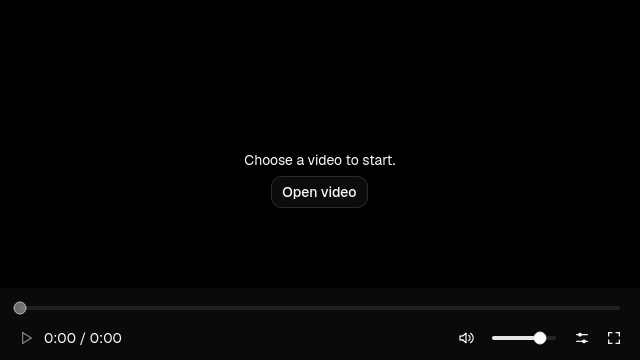
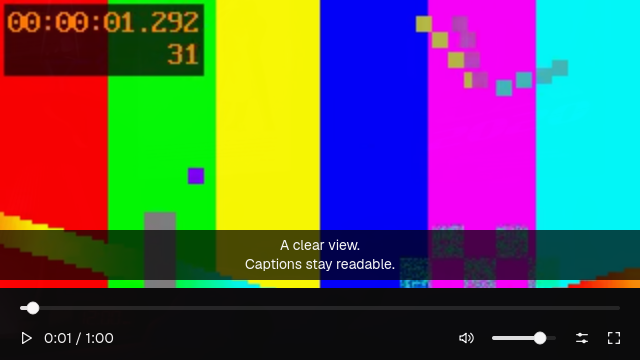
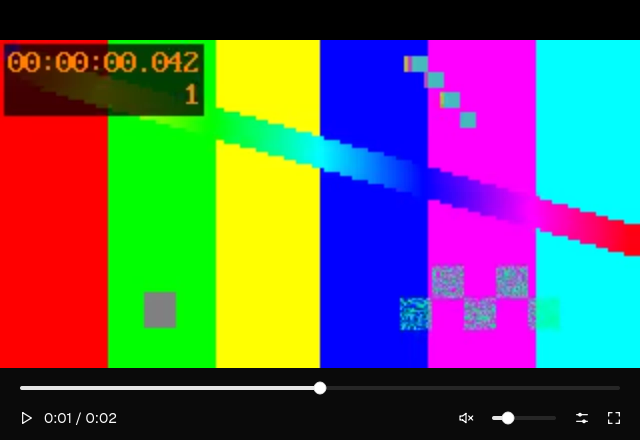
The images below are native captures of the same component, taken from the compositor on Linux while it was decoding and presenting video. They show states the browser build cannot reach, such as an embedded caption track.
Captured on Linux with Qt 6.11.2 and a VP9 fixture. The first is the empty state before a source is loaded, the second shows an embedded caption track rendered above the controls, and the third shows the transport over decoded video.
Installation
Enable the optional media component. On a native build it needs Qt 6.8.2 or later with Multimedia and matching Gui and Multimedia private development headers; a WebAssembly build needs no extra Qt module. Build the example from the repository root:
cmake -S . -B build -G Ninja -DCMAKE_BUILD_TYPE=Release -DSHADCN_BUILD_MEDIA=ON
cmake --build build --target shadcn_video_player
./build/shadcn_video_player
For an installed package:
find_package(shadcn 0.1.1 EXACT REQUIRED COMPONENTS media)
target_link_libraries(app PRIVATE shadcn::media)
The application must use the same Qt version as the media library. Rebuild the library when changing Qt versions. Other widgets do not require Multimedia.
Usage
#include <shadcn/media.hpp>
#include <QApplication>

int main(int argc, char** argv) {
    QApplication app(argc, argv);
    shadcn::install(app);
    shadcn::VideoPlayer video;
    video.resize(960, 540);
    video.show();
    return app.exec();
}
Choose a file with Open video, or supply a source in your application:
video.setSource(QUrl::fromLocalFile("/path/to/video.webm"));
video.player().play();
In a WebAssembly build, give setSource() a URL the browser can fetch, and start playback through the transport:
video.setSource(QUrl(QStringLiteral("media/sample.mp4")));
Controls
The bottom bar provides playback, seeking, volume, settings and fullscreen. Settings include playback speed, available audio and caption tracks, and a fill option. Captions remain visible when idle controls fade away. Keyboard focus reveals the controls; reduced motion removes the fade.
| Key | Action |
|---|---|
| K | Play or pause |
| J | Seek back ten seconds |
| L | Seek forward ten seconds |
| M | Mute or unmute |
| F | Toggle fullscreen |
| Escape | Leave fullscreen |
Shortcuts apply while focus is inside the player. Seeking is available only when the source supports it.
Playback access
On a native build, player() returns the widget's QMediaPlayer. Use its signals to observe position, duration, playback state and errors. audioOutput() returns its QAudioOutput. Both references are borrowed and expire with the widget. Keep the player's video sink connected to the widget's renderer.
Neither accessor is compiled into a WebAssembly build, because there is no QMediaPlayer there to return. The transport remains the interface: the widget's own buttons and shortcuts drive the browser element, and the widget's status label reports what the element says.
setFullScreen(bool) changes fullscreen state. fullScreenChanged(bool) reports changes, including leaving fullscreen with Escape.
What is verified, and what is not
The player has an automated suite of twenty cases covering playback, seeking, the transport layout, accessible names, caption selection, rotation and mirroring against Qt's own frame painter, fullscreen restoration, source opening, destruction during load, the loop and fill settings, and the graphics failure path. It is registered as the eighth CTest suite, so it can fail a build.
Running it needs a display that can present frames. Qt's generic offscreen plugin decodes media correctly but cannot present it, so the player latches its graphics failure and the cases that need rendered frames report a skip; on such a display the suite reports five passed and fifteen skipped. On a display that can present frames, all twenty pass. The repository's tools/media-display.sh starts a hidden virtual display and window manager for that run without installing anything, and the suite is selected with -DSHADCN_MEDIA_PLATFORM=xcb. A skip is a platform limit, not a pass.
The WebAssembly build is not covered by that suite, which links Qt Multimedia. It was driven by hand in Chrome instead: the sample loaded, Play started and stopped playback, the timeline seeked, Mute and the volume slider changed the element, the speed menu set playbackRate to 2, Loop set loop, Fill frame changed how the frame filled the surface, F entered fullscreen and Escape left it. That run is a single browser on Linux, not a cross-browser matrix.
Still unverified: broad codec coverage, 4K and HDR output, hardware texture import, sustained-playback memory use, and every platform and browser other than Linux and Chrome.
The native renderer needs a working graphics backend. A graphics failure pauses playback, disables Play and offers no recovery, rather than pretending another file would help. Its Qt texture helpers use private APIs, which is why the installed media package requires an exact Qt version.